Friday, September 23, 2022

Do It Yourself (DIY) - NCLEX RN Application for New York State

How to apply for Eligibility in NCLEX - New York in the Philippines

These instructions apply to applicants for licensure as a RN who graduated from a nursing school in a foreign country (outside of the U.S. and U.S. territories).

To get your Eligibility in New York State Education Department (NYSED):


Eligibility Processing Time:
TBA

Required Forms to be accomplished (As of September 2022) are:
- Form 1: Personal Information
- Form 2F: Certification of Foreign Nursing Education
- Form 3F: Verification of Other Professional Licensure/Certification


I. Step in Form 2F:- School/Education Verification
Complete this form ONLY if you are applying for an RN or LPN license based on completion of education in a nursing program located outside the United States or its territories and you are not using CGFNS to verify your credentials.

The Office of the Professions will not accept this form if submitted by the applicant.

You have two options for having your foreign nursing education credentials verified to the NYSED:
Option 1: You must arrange to have the Commission on Graduates of Foreign Nursing Schools (CGFNS)* verify your nursing education credentials to the NYSED using CGFNS’ Credential Verification Service for New York State*. If you were also licensed as a nurse in a foreign country, you must arrange for NYSED to receive verification of your nursing license from the licensing authority that issued it.
*CGFNS is a non-profit company that helps foreign educated individuals who want to work in the U.S. as nurses. If you use CGFNS’ Credential Verification Service for New York State, CGFNS will collect and review your foreign nursing credentials. Then CGFNS will send a report to the NYSED regarding your credentials. After the NYSED reviews the report and your RN license application, it will inform you in writing whether your nursing education meets criteria for licensure as a RN in New York State. You may sign up for CGFNS’s Credential Verification Service for New York State online on at: www.cgfns.org or by calling 1-215-349-8767.
- or -
Option 2: You must arrange to have your credentials verified by your foreign nursing school using a Certification of Professional Education (Form 2F). The school will certify your education on Form 2 and send it along with your official transcript and any other required documentation to the NYSED. If your transcript is in a language other than English, you must arrange to have it translated by a translation service acceptable to NYSED. 

Form 2F: Download the form from this link -

Cost:  if varies/depends on your School
For UMAK:
a. TOR for Evaluation Purpose: Php 100
b. Documentary Stamp for TOR: Php 50
c. RLE for Evaluation Purpose: Php 150
d. Nurse Form 2F: Php 150
e. GCash Bank Transfer Charges: Php 15
f. Courier Charges (DHL): Php 2.440.46 
Total expenses in my school: Php 2,905.46

How to fill the Section-1 in Form 2F (Certification of Foreign Nursing Education):
1. Check what you are applying for: Registered Nurse
2. Social Security Number: Leave this blank if you do not have a U.S. Social Security Number.
3. Birth Date: MM/DD/YYYY
4. Print Your Name Exactly As It Appears On Your Application for Licensure (Form 1): Last, First and Middle Name
5. Mailing Address
6. Print your name as it appears on your degree or diploma 
7. Nursing school attended: 
Address:
Date of Attendance from MM/DD/YY to MM/DD/YY 
Date degree/diploma was awarded: MM/DD/YY
Name/Title of the Degree/Diploma issued to you: Bachelor of Science in Nursing
8. Applicant Signature and Date.

All other questions are self-explanatory. Section II should be filled directly by the School.
Your school will send directly to NYSED or otherwise, they will instruct you how to ship the sealed document.


II. Steps in Form 3F:- PRC License - State Board Verification
Complete this form if you hold, or have ever held, a license or certificate to practice any profession* in any jurisdiction outside the U.S. and its territories.

The Office of the Professions will not accept this form if submitted by the applicant.

If you were licensed as a nurse in a foreign country, you must arrange for the NYSED to receive verification of your nursing license from the licensing authority that issued it using a Verification of Foreign Professional Licensure/Certification (Form 3F).

If you are not licensed in Philippines, you can skip this step.

Form 3F: Download the form from this link -

Cost:  
Php 83.00 (75 + 8 Additional Charges) for Leris - State Board Verification
Php 50.00 for Documentary Stamp
Courier Fee: FedEx - Php 2,000 OR DHL - Php 2,200
Total: Php 2,133

Gather all your documents:
- State Board Verification Slip through Leris
- Electronic Official Receipt (EOR) through Leris
- Form 3F (Fill and sign the Section I - Applicant Information)
- Photocopy of valid Professional Identification Card (PIC) - Front and Back (in 1 page only).


How to fill the Form of Verification of Your Foreign Nursing Credentials (Form 3F):
1. Check what you are applying for: Registered Nurse
2. Social Security Number: Leave this blank if you do not have a U.S. Social Security Number.
3. Birth Date: MM/DD/YYYY
4. Print Your Name Exactly As It Appears On Your Application for Licensure (Form 1): Last, First and Middle Name
5. Mailing Address
6. Name of licensing/registration authority to which this form is being sent: Professional Regulation Commission
7. If you were issued a license/certificate by this licensing/registration authority, print your name as it appears on your license/certificate.
Print Name:
Professional title on license/certificate issued (native language spelling): Rehistradong Nars
Professional title on license/certificate issued (English-language spelling): Registered Nurse
8. If you took a licensing examination using a different name, enter that name below.
Last, First, Middle
9. If licensed/certified as a nurse, name of school of nursing
Address:
Date certificate or diploma in nursing was awarded: MM/DD/YY
Certificate/Diploma Title: Bachelor of Science in Nursing
10. Applicant Signature and Date.

All other questions are self-explanatory. Section II should be filled directly by the PRC.


Steps in PRC for State Board Verification:
1. Make an online appointment through PRC-Licensure Examination & Registration Information System (LERIS)
    a.   Go to https://online.prc.gov.ph/Home
    b.   Sign-in to your account in the LERIS
    c.   Click Select Transaction
    d.   Go to Certifications Tab
    e.   In the drop-down menu, select State Board Verification
    f.   Enter your Profession, Quantity (No. of SBV to be applied for) and License Number
    g.   Select preferred PRC Regional Office [NCR-Morayta] – Then, click Proceed
    h.   To complete the transaction, please choose desired Payment Option
    i.   After payment, go to Existing Transaction and Print Document 

2. On the day of your appointment. 
You would be required to fill-out the Health Declaration form and get you temperature checked before you are allowed to enter the PRC Building. The form is in a small box few steps away from the entrance. Fill-out the document and line-up to enter the PRC Building.

3. Proceed to Customer Service Center (CSC) at Windows M, N, or O (near entrance gate) to purchase a Documentary stamp. 

4. For Initial assessment of PRC Officer of State Board Verification Window.
Proceed to Window A to the State Board Verification Window.
Submit the documentary requirements for initial assessment and verify if you have the complete documents.

5. Payment of Courier Service
The PRC Officer would ask you to pay for express delivery. Then you have to proceed to DHL or FedEx outside the PRC office. The courier service will advise you when does the PRC will lodge your requested document and you will receive an SMS for the tracking number. 

6. Return to State Board Verification Window, submit all the document and sign the Logbook.

7. You will receive a SMS notification for the Air Way Bill (AWB)/ Tracking number of your document. You can directly track you document on DHL/FedEx as per the below website:


III. Steps to Complete New York State's Required Coursework:
You must complete a NYSED Approved Infection Control Course and a Child Abuse Identification and Reporting Course from an approved provider or qualify for an exemption.

Mandatory Training  
Mandatory trainings required in New York are:
- Child Abuse Training
- Infection Control Training

You can purchase in any Approved Providers of Training listed on: 

I preferred to purchase All Access Pass that includes unlimited CE courses for 1 year in CEUFast.


Cost:
USD 39 (Fee as of 15 Sep 2022). 
Approx: Php 2,228.46 (Rates varies on the US dollar exchange rate) 

You cand download your certificate on your CEUFast account. Just simply, select the drop down menu My Account. Then, click Go to My Account. And select the training course to view and save the certificate.


IV. Step in Form 1:- Personal Information - Online Form 
All applicants for licensure must initially submit Form 1 along with the $143 licensure and first registration fee. You must answer all questions and provide all information requested unless otherwise indicated. Failure to accurately complete all required parts of the application will delay its review. Additional forms below are required based on the licensure requirements of the profession. Do not use Form 1 to renew your existing license.

Cost:
USD 143 (Fee as of September 2022). = Approx: Php 8,195.40
This fee covers your license and your initial RN registration.
You must pay the $143 license and first registration fee by credit card.

Documents to be Uploaded - Scan copy of:
1. Diploma in BS Nursing
2. Highschool Diploma
3. Valid Passport
4. Certificate in Child Abuse Training
5. Certificate in Infection Control Training
6. Marriage Certificate (If you are married and your name appears on your degree or diploma is when you are in single).

Take note: 
- You do not need to upload your TOR and RLE as it directly sends by your school to NYSED.
- You do not need to upload your license as it directly sends by the PRC to NYSED.


Form 1: Online Form

1. Select your profession to start a new application. Select Registered Nurse, then click Start.

2. Select what type you are applying for. Select Apply for a new license.


Then click Begin Application.


2. Answer the personal information, then click Continue Application.


3. Your application ID will reflect on the site. Continue answering and upload documents related to:
  • Page 1: History & Moral Character
    • Accommodations
    • History
    • Moral Character
  • Page 2: Examination
    • Examination History
    • Previous Nursing Licenses
  • Page 3: Education
  • Page 4: Experience
    • Previous Licenses/ Certificate
    • Current/Previous Professional Licenses and Certificates
  • Page 5: Additional Information
    • Child Support Obligation
    • Citizenship/Immigration Status
    • Passport/Immigration Document - Upload
    • Coursework
    • Training Requirements
    • Child Abuse Training Document - Upload
    • Infection Control Training Document - Upload
    • Gender and Ethnicity
Then click Submit.


4. Review and Sign. Carefully review all the information you have provided. 
If any information needs to be changed and updated, you must modify before signing the application.
You will not be able to make changes to the electronic application after it has been submitted.

Once you have reviewed your responses and are satisfied that the information provided is accurate, then complete and sign the attestation at the end of the page. Simply type your full name provided on your application. Then click Continue Application.


5. Enter your payment details to proceed your application.


After successful payment, you will be given 7 minutes to record and/or print the page for your records.

You will receive an email of:
  • Application ID details

  • Receipt of your online application.

  • Payment receipt for your Registered Nurse application.


V. Upload Additional Documentation (Optional)
If you already completed Online Form 1 and want to upload additional documentation to your application, you will need your Application ID, and date of birth to access your application.

use this link:


Additional Documents (Optional):
1. Certificate of Disposition
2. Child Abuse Training
3. Continuing Education Certificates
4. CPR Requirements
5. Diploma
6. High School Diploma/Transcript
7. Immunization Training Certificate
8. Infection Control Training
9. Moral Character Documentation
10. NYSED Form
11. Other
12. PALS/ACLS Document
13. Passport/ Immigration Document
14. Testing Accommodations


VI. NCLEX Examination Approval 
You will receive an email notification that your NYS Application has been approved
Subject: NYS NCLEX Examination Approval


You may check the status of currently reviewing documents:


VII. Pearsonvue Registration
Once your examination approval granted. You may register and pay the examination fee online by visiting the link provided on your eligibility email:

Registering for the NCLEX is a multistep process that includes the nursing regulatory body (NRB) and Pearson VUE. 

Registration Fee (Seeking Licensure to US): USD 200


Steps in Registration in Pearson VUE:
1. Go to the link provided on your eligibility email: https://www.pearsonvue.com/nclex/ 
2. Click Register, then click Register Now.
3. On the Pearson VUE policy, tick all the:
    a. Data Collection
    b. Data Processing
    c. Data Transfer
    d. CCTV
    e. Palm Vein Consent
Then click Agree button to proceed.
By clicking the “Agree” button, you acknowledge that you understand, agree, and explicitly consent to the terms contained in the Pearson VUE.

4. Start to create a Web Account
    a. Personal information (Step 1 of 4)
    Personal
    Title: Example: Mr., Ms., Mrs., Dr.
    *First Name / Given Name: Enter as it appears on your government issued ID
    Middle Name:
    *Last Name / Surname / Family Name: Enter as it appears on your government issued ID
    Suffix: Example: Jr., Sr., II, III, IV
    Email
    Email:
    Confirm Email:
    b. Contact information (Step 2 of 4)
    Home Address and Telephone
    *Address Type: Home
    *Location/Region: 
    *Address 1:
    Address 2:
    Post Code:
    *City:
    *Telephone:
    Mobile Telephone Number:
    Communication Preferences
    Correspondence Language: English

    c. Additional information (Step 3 of 4)
    Additional Information
    What is your mother's maiden name (last name only - mother's family name before marriage)?
    *What is your date of birth?
    What is your gender?
    What is your U.S. Social Security Number? (For U.S. licensure candidates only)
    If you are currently or were married, what is your maiden name?
    If you ever changed your name, what is your previous last name?
    If you answered the previous question, when did you last use this name (mm/yyyy)?
    What is your primary language? English and Another language

    d. Login information (Step 4 of 4)
    Login Information
    Username: Your username must contain 6 or more characters.
    Password:
    Security Question

5. After creating a web account in Pearson VUE, you may start the registration process

Find an exam
Note: Any requests to change an examination type will result in a change fee. See the Candidate Bulletin  for more information.

I am seeking licensure/registration in the US, U.S. Territory or Australia
I am seeking licensure/registration in Canada

I am seeking licensure/registration in the US, U.S. Territory or Australia 
NCLEX-RN The National Council Licensure Examination for Registered Nurses 
NCLEX-PN The National Council Licensure Examination for Practical Nurses


VIII. Authorization to Test (ATT)

The Authorization to Test (ATT) is issued by email once the NRB declares you are eligible to test and registration through Pearson VUE is complete. The ATT email will be sent to the email address provided when registering.

If you do not automatically receive your ATT in your email within 48 hours after you register with Pearsonvue. Use the below link in order to request to be made eligible:
Select your topic: Request for ATT #

Click the Request an Authorization to Test (ATT) or Exam Eligibility request.
Answer all the required information accordingly. Then click Submit.

Each ATT is valid for a period of time specified by the NRB, dates must test within the validity dates.


IX. Scheduling your Exam.
You must have your ATT email to schedule an appointment to take the NCLEX.


X. Examination Day
Plan to arrive at the test center at least 30 minutes before your scheduled testing time. If you arrive more than 30 minutes after your scheduled appointment, you may be required to forfeit your NCLEX appointment. Your failure to take the examination will be reflected in your registration as a case report which will be viewable by your nursing regulatory body (NRB) 

Test Center:
Pearson Professional Centers-Manila, Philippines
27th Floor, Trident Tower, 312 Senator Gil Puyat Avenue, Makati City, 1227 Manila, Philippines


Dress Code:
As per the Guidelines by Building Management, slippers and shorts are not allowed in the building. 


XI. Exam Result
Examination results are sent to you by your NRB. Wait a minimum of six weeks following your examination for your results to arrive.

For Retake:
The NCSBN retake policy allows candidates to take the NCLEX eight times a year, and there must be 45 test-free days between each examination. This is unless the desired jurisdiction of licensure/registration only offers a limited amount of NCLEX exams per year. Candidates are encouraged to contact the NRB for their policy on NCLEX retakes.


---
Actual Expenses (As of September 2022):
Form 1 (Online - Personal Information and Mandatory Trainings): Php 10,423.86
Form 2 (School - Education Verification): Php 2,905.46
Form 3 (PRC - Verification of Foreign Professional License): Php 2,133

TOTAL (Eligibility):  Php 15,462.32

(As of December 2022):
Registration on the Pearson VUE: USD 200 (Approx. Php 10,984)

(As of January 2023):
Schedule of Exam: USD 150 (Approx. Php 8,468.14)

GRAND TOTAL (Overall): Php 34,914.46

Wednesday, February 16, 2022

UAE Golden Residence Visa

How to apply for Golden Residence Visa in Abu Dhabi (inside) for Specialist in the fields of Engineering and Science.  

Golden visas can be only granted to individuals nominated by government or royal court officials. Sometimes individuals are nominated by senior Emiratis or government bodies, and in other circumstances people apply online. If an individual is awarded a golden visa, then their spouse and children can also apply.

Persons who are talented in the fields of engineering and science (As of October 2021) are:
- Big Data
- Artificial Intelligence
- Biotechnology Engineer
- Computer Engineer
- Electrical Engineer
- Electronics Engineer
- Epidemiology and Virology
- Genetic Engineer
- Software Engineer


First Step:- Be Nominated!  

Nomination Processing Time:
Within 30 days you will receive an email notifying you of the outcome of your application to be nominated.
Or otherwise, you might receive a notification for returned for modification for other possible request. Your application is likely to be cancelled after 30 days if it is rejected due to inadequate documents and information.

Cost:
AED 51.40 [Nomination through ICP] (Fee as of October 2021).

Nomination Requirements - Scan copy of:
- Equivalency Certificate issued by the Ministry of Education in one of the above-mentioned majors (engineering and science fields)
- Work contract for a profession in one of the above-mentioned specializations (engineering and science fields)
- Passport copy (must be valid in more than 6 months).
- Valid Health Card insurance is not less than one year and can be extended.
- Labour Card (this can be generated in your MOHRE App).
- Current Employment Visa
- Colored Photo

Application through UAE ICP website:  
1. Go to the UAEICP website using your explorer.
https://beta.smartservices.icp.gov.ae/echannels/web/client/default.html#/login

Create your account by selecting "Individual Registration". OR selecting "Sign in with UAEPass". OR simply log-in using your registered email and password (for those who have already created an account).


Ensure all the required documents already save to your computer.

2. Enable the email notification.
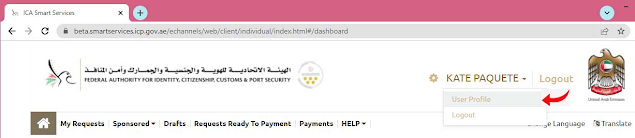
Go to "User Profile"


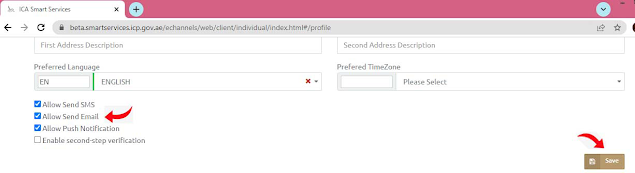
Complete all your profile and ensure to allow all the notification especially "Allow Send Email". Then click "Save", to update the changes you had made


Take note that your nomination approval will be sent to your email and this will be the "Proof of Eligibility for Golden Residency".

3. Fill the Requested Information.
Go to: https://smartservices.icp.gov.ae/echannels/web/client/guest/index.html#/nomination/request/767/step1?administrativeRegionId=1

Complete all the required information. Take note on the below:
a. Person Category is "Person Who Are Talented", for those Specialist in the fields of Engineering and Science.
b. Person Sub Category is based on your specific specialization in engineering and science fields
c. Choose ID can be "Unified Number" that can be found on your employment visa OR "Identity Number" which is your Emirates ID number. It's your choice.
d. Full Name (Arabic) is automatically filled when you fill your Full Name (English).

Other questions are self-explanatory. Answer the ReCaptcha, Then click "Next".

4. Attach your documents.
It is advisable to upload the equivalency certificate or your working contract to the "Required" document and the rest of requirement listed above will be on "Optional".
Then click "Next".

5. Review your application.
Make sure all the filled information and uploaded documents are accurate.
Then click "Next".

6. Pay your fee.
Check the "I Agree to the Terms And Condition".
Then click "Submit", to proceed with the payment.

After the payment and submission of the required documents, you will receive an email from the authorities concerned, confirming the receipt of your application and its progress.
For instance that you received a notification to returned for modification. Simply, comply to the ICP request which can be seen on the comment section. You have to complete the modification within 30 days of returned. Otherwise, your application is likely to be cancelled/rejected after 30 days due to inadequate documents and information.

Once you received an email notifying you that you are nominated, only then you can proceed with the next step which is to request for eVisa.


Nomination Request for Golden Residence Approved.  


Second Step:- Request to Issue New Visa  
You can go to these step only once you received a proof that you are nominated with golden visa.

Cost:
AED 305.52 (Fee as of October 2021).

Processing Time:
Depends on how fast your current visa will be cancelled.

Entry Visa Requirements - Scan copy of:
- Proof of Eligibility for Golden Residency, the email notification that you are nominated is suffice.
- Passport copy (must be valid in more than 6 months).
- Colored Photo
- Valid Health Card insurance is not less than one year and can be extended.
- Equivalency Certificate issued by the Ministry of Education in one of the above-mentioned majors (engineering and science fields)
- Work contract for a profession in one of the above-mentioned specializations (engineering and science fields)
- Current Employment Visa
- Labour Card

Procedure on how to request a new visa for Golden Residence for person who are talented:  
1. Go to the link provided on the email that you received on your nomination approval.
https://beta.smartservices.ica.gov.ae/echannels/web/client/guest/index.html#/issueVisa/request/635/step1?administrativeRegionId=1

Complete all the required information. Take note on the below:
a. Applicant Arabic Name is automatically filled when you fill your Applicant English Name.
b. Reason For Request is based on your specific specialization in engineering and science fields.
c. Establishment Department will be in Abu Dhabi.
d. Since the Establishment Number is mandatory, you can put "01".
e. For Nomination Request Information:
Request Number is the nomination reference number mentioned on the email in your nomination approval.
Enter the email address that you register during the nomination request. Then click "Check" to verify that your nomination approval is legit.
f. UAE Unified No. can be found on your current residence visa.

Other questions are self-explanatory. Then click "Next".

2. Attach your documents.
Attached all the "Required" document and the rest of requirement listed above will be on "Optional".
Then click "Next".

3. Review your application.
Make sure all the filled information and uploaded documents are accurate.
Then click "Next".

4. Pay your fee.
Then click "Submit", to proceed with the payment.

After the payment and submission of the required documents, you will receive an email from the authorities concerned, confirming the receipt of your application and its progress.
For instance that you received a notification to returned for modification. Simply, comply to the ICP request which can be seen on the comment section.

5. Current Visa/Residence Cancellation
Once your documents are successfully reviewed, you will received an email notification, requesting you to proceed to cancel your existing visa/residence within 30 days. Otherwise, your application is likely to be cancelled/rejected after 30 days due to non-compliance.


You have to communicate with your current employer and have a mutual agreement in order to comply with your visa cancellation within 30 days. Take note that your employer has to get the employee's work permit cancelled before seeking the visa cancellation. Therefore, you have to get your gratuity (as per MOHRE Labour Law) in order to proceed with work permit and residence visa cancellation. Ensure that your health insurance is still valid.

Once your existing visa is cancelled, the ICP system will automatically detect and process your application.
 
Once your application is approved, you will received an email notification that issue new visa has been approved as well as another separate email requesting you to change status.


6. Print your Entry Permit.
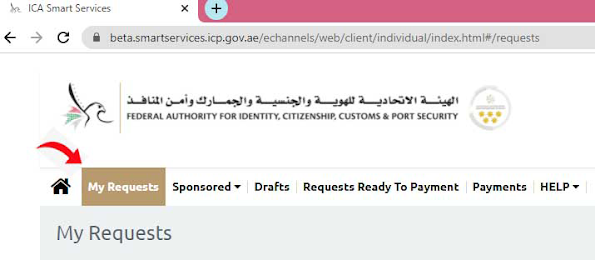
Log-in to your ICP account, Then go to "My Request".


Look for the service type "VISA - GOLDEN RESIDENCE - PERSONS WHO ARE TALENTED - ISSUE NEW VISA". Then click the "Action" button to select "Print Electronic Visa With Rules".


Issue New Visa Approved.  


Third Step:- Change Status  
Cost:
AED 558.93 (Fee as of October 2021).

Processing Time:
1 day

Change Visa Requirements - Scan copy of:
- Entry Permit eVisa
- Passport copy (must be valid in more than 6 months).
- Colored Photo
- Valid Health Card insurance is not less than one year and can be extended.
- Equivalency Certificate issued by the Ministry of Education in one of the above-mentioned majors (engineering and science fields)


Procedure on Change Status:  
1. Go to the link provided on the email that you received on your change status request.
https://beta.smartservices.ica.gov.ae/echannels/web/client/default.html#/verifyProActiveServices?applicationRef=2996FA7A3AA1C71F178B735BE25DFE56552&serviceType=CHANGESTATUS

Complete all the required information. Take note on the below:
File Number and Unified No., can be found on your Entry Permit eVisa

All other question are self-explanatory, Then click "Next".

2. Attach your documents.
Attached all the "Required" document and the rest of requirement listed above will be on "Optional".
Then click "Next".

3. Review your application.
Make sure all the filled information and uploaded documents are accurate.
Then click "Next".

4. Pay your fee.
Then click "Submit", to proceed with the payment.

After the payment and submission of the required documents, you will receive an email from the authorities concerned, confirming the receipt of your application and its progress.
Once your application is approved, you will received an email notification that change status has been approved.

5. Print your eVisa - Change Status.
Log-in to your ICP account, Then go to "My Request".

Look for the service type "RESIDENCY - ALL RESIDENCE TYPES - CHANGE STATUS - CHANGE STATUS". Then click the "Action" button to select "Print Change Status Confirmation".


Change Status Approved.  


Fourth Step:- Emirates ID Application  
Cost:
AED 1,054.20 (Fee as of October 2021).

Processing Time:
Printing of EID will vary on the confirmation of your golden residence visa approval.

EID Requirements - Scan copy of:
- eVisa-Change Status
- Passport copy (must be valid in more than 6 months).
- Colored Photo
- Previous Emirates ID - Front.
- Previous Emirates ID - Back.


Procedure on EID Application:  
1. Complete all the required information. 

Go to Emirates ID Services to Renew Emirates ID for Resident:
https://smartservices.icp.gov.ae/echannels/web/client/visaHolder/index.html#/icaServices/eidaForm/571/step1?administrativeRegionId=1

Take note on the below:
Unified No., can be found on your Change Status eVisa

All other question are self-explanatory, Then click "Next".

2. Attach your documents.
Attached all the applicable documents as requested.
Then click "Next".

3. Review your application.
Make sure all the filled information and uploaded documents are accurate.
Then click "Next".

4. Pay your fee.
Then click "Submit", to proceed with the payment.

5. Print your EID Application.
Log-in to your ICP account, Then go to "My Request".

Look for the service type "EMIRATES ID SERVICES - EMIRATES ID FOR RESIDENT - EMIRATES ID FOR RESIDENT - RENEW EMIRATES ID". Then click the "Action" button to select "Print Application".


EID Application Printed.


Fifth Step:- Residence Visa Approval  

Cost:
AED 1,217.80 - (Visa Fee as of October 2021).
AED 250 (Standard Medical Fee as of October 2021).

Processing Time:
Undetermined.

Visa Requirements - Scan copy of:
- Change Status eVisa
- Passport copy (must be valid in more than 6 months).
- Colored Photo
- Medical Fitness Test Result
- EID Application
- Insurance Card OR Undertaking letter (in Arabic)
- Tenancy Contract OR Undertaking letter (in Arabic)
- Proof of Eligibility for Golden Residency, the email notification that you are nominated is suffice.

Medical Screeening Requirements:
- Alhosn green status and face mask (As of October 2021).
- Printed Copy of  Change Status eVisa.
- Printed Copy of  EID Application
- Valid Passport (Copy and Original).
- Printed Proof or Screenshot of your Appointment.  


Procedure on Issuance of Residence Visa:  
1. Book your appointment and do your Residence Visa Screening.
Capital Health offer a reliable medical screening for residence visa.
Appointments can be made in the following ways:
Call Toll Free: 800 SCREEN (800 727 336*)
Email: info@capitalhealth.ae

You will receive a SMS or email confirmation within 24 hours, from the time of application submission.

Visit the selected centre location on the confirmed date and time. 
Original receipt will be provided upon completion of your medical screening.


2. Collect your Medical Fitness Test Result.

You can track your certificate on the below:

Certificates can be collected from the centre by showing the original receipt. Results will be available on the same day for VIP screening*, within 24 hours for FastTrack and within 48 hours for Standard screening package.

Of course, you must be FIT in order to be eligible to apply for the visa.
 

3. Request to Issue Residence for Golden Residency (10 Years) of Person Who Are Talented.
Gather all the visa requirements and ensure all the required documents already save to your computer.

Go to:

Complete all the required information. 
Then click "Next".

4. Attach your documents.
Attached all the required documents as requested.
Then click "Next"

5. Review your application.
Make sure all the filled information and uploaded documents are accurate.
Then click "Next".

6. Pay your fee.
Then click "Submit", to proceed with the payment.

After the payment and submission of the required documents, you will receive an email from the authorities concerned, confirming the receipt of your application and its progress.
Once your application is approved, you will received an email notification for your residence approval confirmation.

For instance that you received a notification to returned for modification. Simply, comply to the ICP request which can be seen on the comment section. Otherwise, your application is likely to be rejected due to inadequate documents and information.

7. Print your Residence Approval Confirmation.
Log-in to your ICP account, Then go to "My Request".

Look for the service type "RESIDENCY - GOLDEN RESIDENCY (10 YEARS) - PERSONS WHO ARE TALENTED - ISSUE RESIDENCE". Then click the "Action" button to select "Print The Approval".

Residence Visa Approved.


Last Step:- Residence Visa Stamping and EID Printing
Cost:
AED 36.75 - (Post Office Fee as of October 2021).

Processing Time:
TBA

Visa Stamping Requirements:
- Printed Copy of Residence Approval Confirmation
- Original Passport
- EID Application Copy


Procedure on Visa Stamping:  
1. Go to nearest post office on your area.
Submit the necessary requirements and provide your delivery address.

2. Pay your fee.
They will provide you a tracking number and official receipt of payment.

3. Original Passport Delivery.
You will received a phone call or sms notification for the delivery of your original passport.

Residence Visa Stamped.


Track Your EID Printing:
Note: PRAN/ID can be found on your EID application.

To expedite the EID printing, contact and provide the PRAN/ID.
Fill the contact us form on: https://icp.gov.ae/en/contact-us/

You will received an email notification that your EID is already printed.

Then wait for the courier. You will received a phone call or sms notification for the delivery of your original EID.

The expiration date of your Emirates ID depends on the expiration of your resident visa.

EID Printed Done.


Actual Expenses (As of October 2021):
Nomination - 51.40
Electronic Visa - 305.52
Change Visa - 558.93
EID - 1,054.20
Medical - 250
Residence Visa - 1,217.80
Post office (Visa stamping) - 36.75
TOTAL: AED 3,474.60


Achieve!!! 😄😄😄

I can do all things through Christ which strengthened me... Philippians 4:13

Tuesday, October 30, 2018

IQAS Application

International Qualifications Assessment Service (IQAS) 

Processing Times:
- At least 15 weeks to process. This does not include mail delivery time.
- Processing time is not guaranteed.
- No rush assessments.

Cost: 
- Application fee: $200
- Courier fees: $15 for a Canadian address; $75 for an international address
- Additional Certificate: $15 each

Required Documents:
- Completed ECA Application Checklist.
- Completed, printed and signed IQAS Application Form with Payment receipt
- Proof of name: Photocopy of Passport
- Photocopy of Degre Certificates (Diploma + TOR)
- Translations of all non-English educational documents (If applicable)
- Proof of name change (if applicable)


Follow these steps to apply for an Educational Credential Assessment (ECA) for immigration purposes:


1. Create your account here:
https://iqas.labour.alberta.ca/FACS/External/ApplicationRequest


2. Sign-in
https://iqas.labour.alberta.ca/SignIn


3. Select ECA on the left side


4. Tick the (I agree with the disclaimer) box to proceed.


==  Steps Before November 2018

1. Download and filled the ECA Checklist.


2. Complete the online ECA Application form:

https://iqas.work.alberta.ca/eca#/


a. Read and tick the "I agree with the disclaimer", then click START MY APPLICATION to proceed.


b. Read the assessment application information and click APPLY NOW.


c. Enter your email address and click VALIDATE EMAIL ADDRESS.


d. Check your email, subject: Email Address Confirmation Request. In order to confirm your email, please type the following PIN number in the text area presented on the IQAS screen.


e.  A green check sign will show on the right side of the PIN to show the email was verified correctly, otherwise cross sign will show that means PIN is incorrect. Once the PIN was successfully verified, then click NEXT to proceed.


f. Fill the personal information, then click NEXT to proceed.

- Last or family name
- First name
- Middle name(s)


g. Fill the mailing information, then click NEXT to proceed.

- Address Line 1
- Address Line 2
- Address Line 3
- Address Line 4
- City
- Country
- Province / State
- Postal/Zip Code


h. Fill the contact information, then click NEXT to proceed.

- Home Phone
- Work Phone
- Mobile Phone


i. Fill the additional personal information, then click NEXT to proceed.

- Birthdate
- Country of Birth
- Gender
- Last Country of Education


j. Fill the other information, then click NEXT to proceed.


 k. Fill the education information. List all schools, colleges, institutes and universities attended, then click NEXT to proceed.
- Institution Name (when you attended):
- Institution Name (if changed):
- Country:
- Language of Instruction:
- Dates of Instruction:
= From:
= To:
- Certificate / Diploma / Degree:


 l. Choose the assessment type, then click NEXT to proceed.


m. Payment calculation information will show, then click NEXT to proceed.


n. Choose the method of payment, then click NEXT to proceed.
 

n. 1. Online payment will transfer to secure banking portal, then click NEXT to proceed.

n. 1a. This page will proceed with banking portal. Note: Do not tried to go back on the previous page otherwise error will occurs and you have to repeat the procedure from the start.

 n. 1b. Complete the payment transaction details and click SUBMIT PAYMENT.


n. 1c. Once payment was successful, a payment confirmation notification will shown. Check your email for the acknowledgement of your application, application form, ECA checklist and payment receipt.


n. 2. For money order or bank draft options. An application completed notification will show, click PRINT MY APPLICATION. And check your email for more information.


http://www.cic.gc.ca/english/helpcentre/answer.asp?qnum=681&top=29